Reply on X & LinkedIn in
Quiplos reads the thread, writes three replies the way you would, and drops your pick into the reply box. You hit Post.
Free to try · No card needed · Never posts for you
 Chrome
 Edge
 Brave

Shipped my first SaaS this weekend. 0 users, 100% proud. What’s the one thing you wish you knew before launching?
Not just a reply
A reply that sounds like you
Copy, prompt, paste back
Open a chatbot, paste the post, write a prompt, copy the answer into X.
- Same voice for everyone
- Misses the thread and context
- One answer, lots of copy-pasting
One click, in your voice
Click ✦ under the post, right inside X or LinkedIn. Pick one of three replies.
- Writing DNA: learns from replies you wrote
- Context-aware: reads the post and the thread
- 3 choices per click, each with a natural-sounding check
- You’re in control: edit anything, never auto-posts
Everything you need
Nothing you don’t
A small tool that does one job well: help you reply on X and LinkedIn faster, in your own voice.
Three replies, one click
Click ✦ under any post on X or LinkedIn and get three suggestions that actually read the post and its thread.
Learns your voice
Paste a few replies you have written. Suggestions follow your words, length and vibe.
Never makes things up
Add true facts about yourself once. Quiplos only states personal details you gave it.
Tone and length in a tap
7 tones from Friendly to Smart. Shorter, longer or more casual without retyping a prompt.
6 languages
English, Hindi, Hinglish, Spanish, Portuguese and Japanese. On Pro, replies match the language of the post on their own.
Inserts right where you reply
Drop a reply into the X reply box or LinkedIn comment box, edit it if you like, and post it yourself. It never posts for you.
And more inside
Small things that make replying every day easier.
Living Voice
Learns from replies you rewrite and the kind you pick most. Import your old X or LinkedIn replies in one click.
Refine one reply
More like me, more confident, or strip AI-sounding phrases, in one tap.
Explain any post
A quick summary or translation before you reply.
Quote posts
Switch to Quote mode to write a quote post instead of a reply.
Write a postPro
Turn an idea into 3 posts or an X thread, in your voice.
Reply Later & Drafts
Save posts for later and keep the replies you did not use.
Results & Replies to you
See which replies got likes, and who answered or tagged you.
Quip, your helper
A friendly guide in your dashboard. Ask it anything about Quiplos.
See a post
Reply in seconds
Quiplos lives right under every post on X and LinkedIn.
The real thing
Not a mockup
Screens straight from the extension.
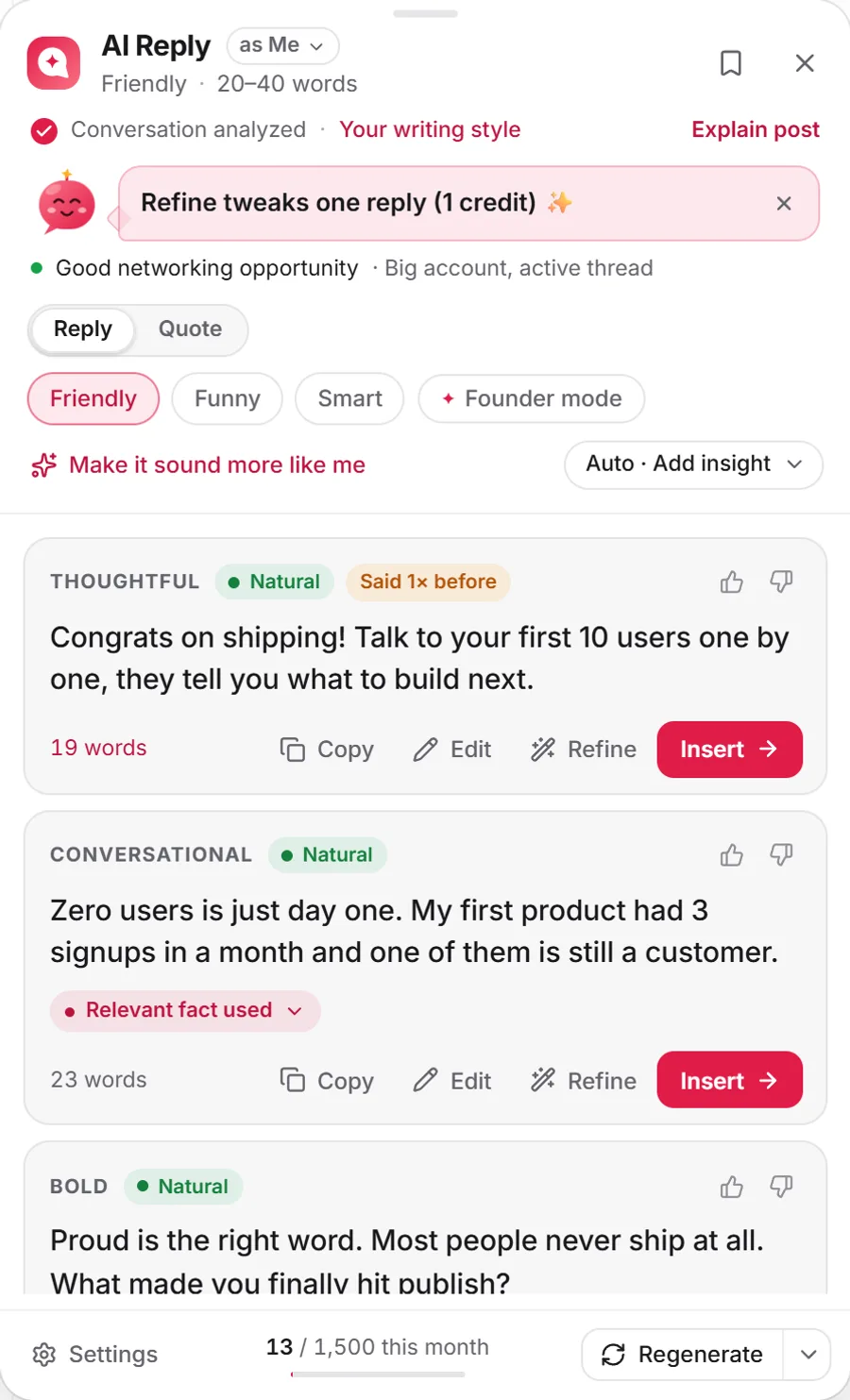
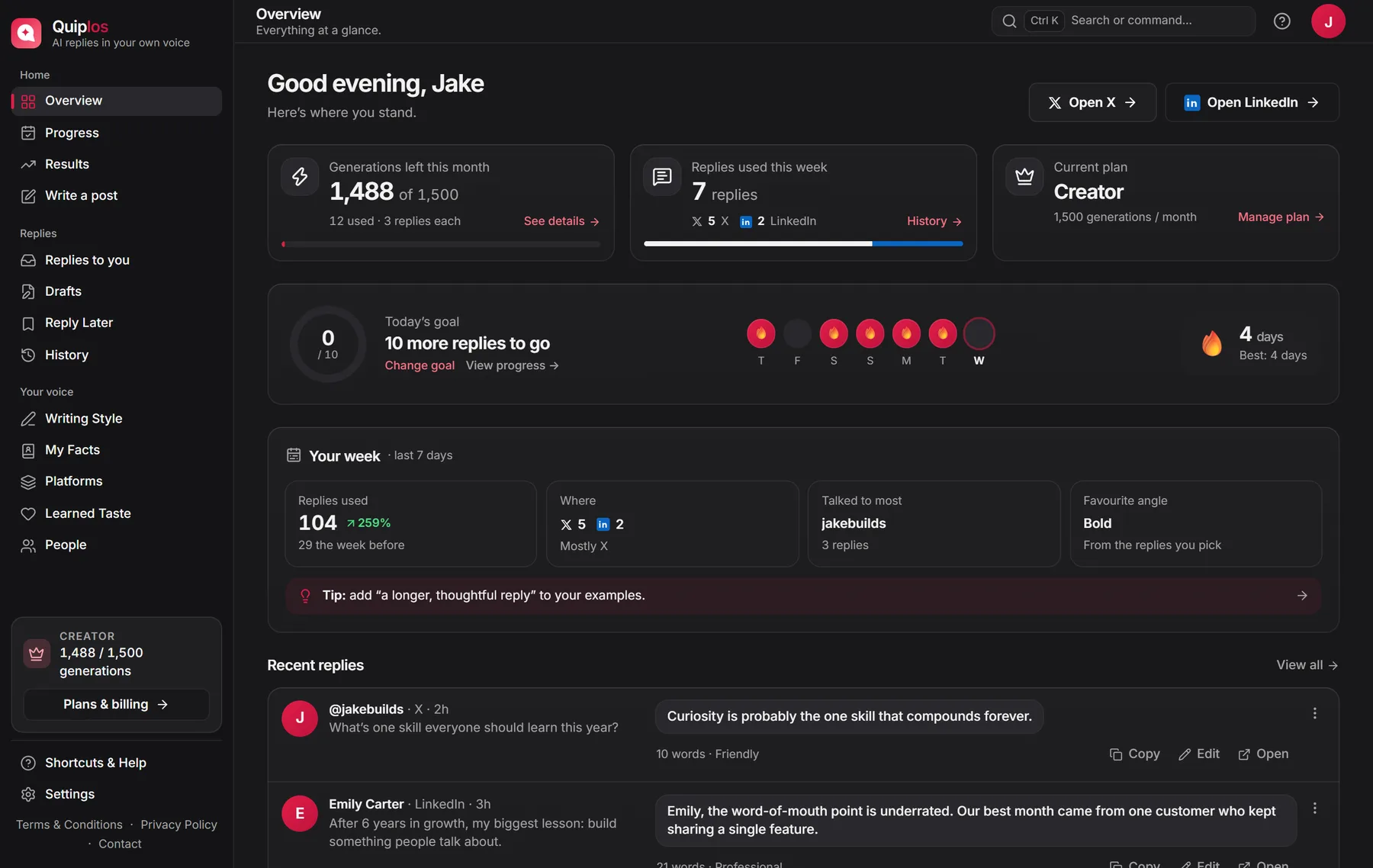
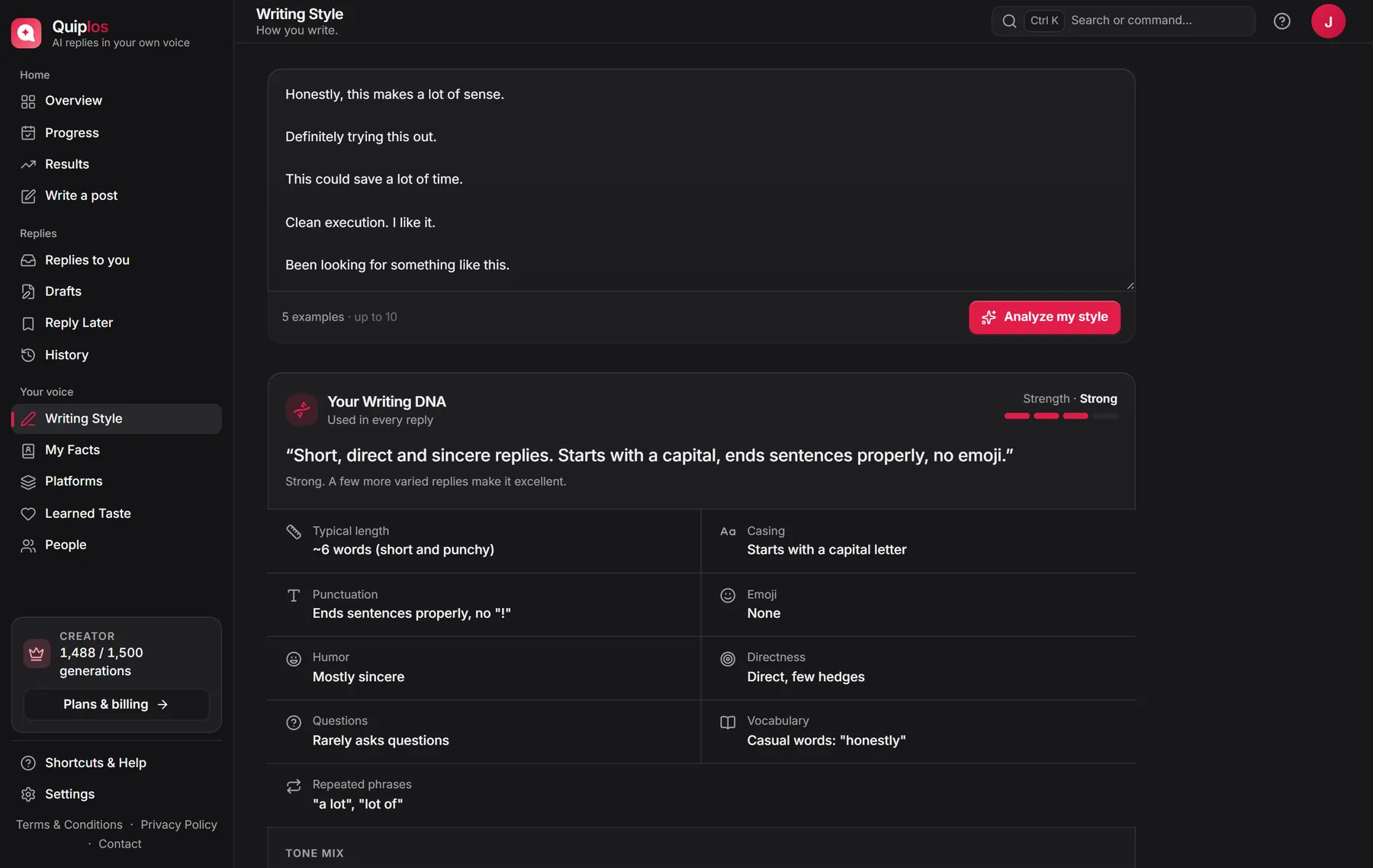
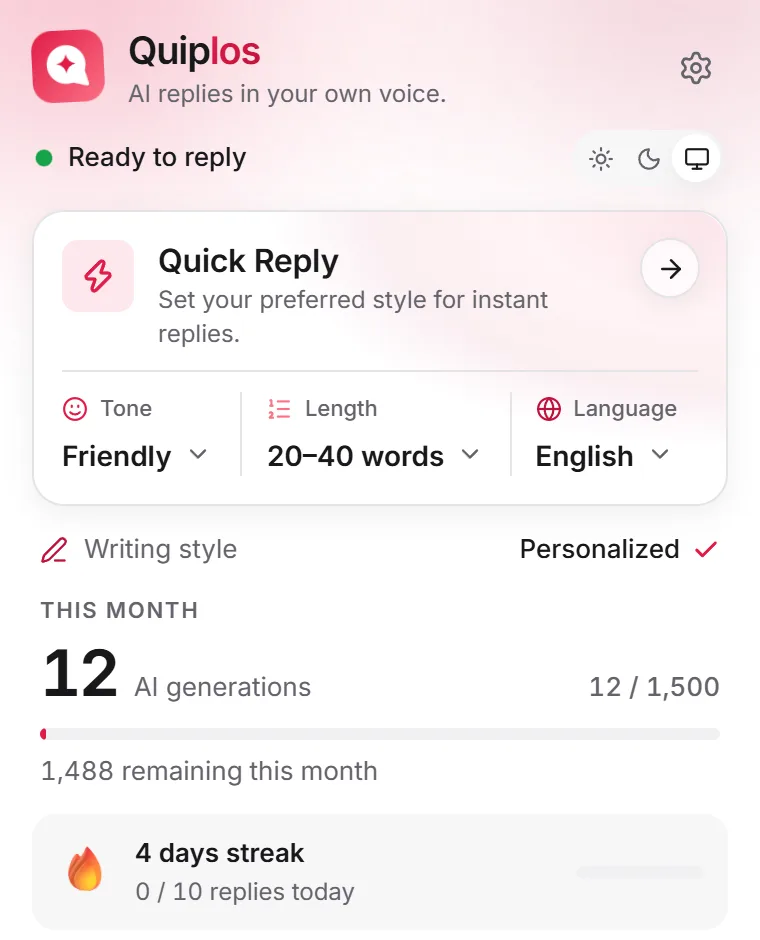
Three replies in your voice, right under the post on X and LinkedIn.
Sounds like you
Stays true to you
Built from replies you actually wrote
Paste a few of your own replies. Quiplos uses them as examples every time it writes, so suggestions pick up your tone, your words, your sentence length and your emoji habits. No prompt writing, no settings to tune.
- You choose every example it learns from
- 3 examples on Free, 10 and a style profile on Pro
- Kept on your device, synced when you sign in
- Honestly the first 10 users teach you more than any launch.
- Shipping beats polishing. Ugly v1 with real users wins.
- Small, boring wins every day add up faster than you think.
Never makes things up about you
Add a few true details once: what you do, where you are based, your links. Quiplos only states personal facts you gave it, and only the ones that fit the post are used.
- 5 facts on Free, 30 on Pro
- Only relevant facts are sent with a reply
- Edit or delete them any time
- Founder of a small design studio
- Based in Austin, Texas
- Launched my first product in 2024
- Writes about bootstrapping and growth
Built for people who
live in the replies
Creators
Reply faster without losing your personality.
Haha thank you! Part 2 drops Friday, this one gets nerdy 🎬
Founders
Stay active in your niche without spending hours writing replies.
Great catch. Fix ships today. Thanks for flagging it so fast.
Personal brands
Keep your voice consistent in every reply.
Love this take. Consistency beat talent for me too, every time.
Community builders
Join more conversations, naturally.
Welcome in, Maya! Drop what you’re building below 👇
Your voice
stays yours
Quiplos only sends a post when you ask for a reply. Your voice comes from examples you choose and replies you use. It writes your replies and is never used to train AI models.
Read the privacy policy- You control what it learns: edit or delete any example, fact or saved reply, or reset it
- No auto-posting. Every reply is yours to edit, insert or skip
- History, drafts and saved posts stay in your browser. Examples and facts sync to your account
- Only what one reply needs is sent. No ads in the extension, and we never sell your data
Simple honest pricing
Start free and upgrade anytime
Start free. Upgrade when you reply every day. Copy, edit and insert are always free.
✦ 1 generation = 3 reply suggestions🎉 Product Hunt special: 30% off Pro for 3 months with code PRODUCTHUNT at checkout · until Nov 20
Free
For trying Quiplos.
- 3 suggestions per generation, on X and LinkedIn
- Friendly, Casual & Professional tones
- Replies in English, length presets
- Learns your voice from the replies you use
- Up to 3 style examples and 5 facts
- Drafts, Reply Later, Results & Replies to you
- Reach warnings, streaks and a daily goal
10 free generations · no card needed
Pro
For creators who reply every day.
- Everything in Free
- All 7 tones
- 6 languages incl. Hinglish, auto-matched to the post
- Custom reply length
- Writing DNA style profile and 10 style examples
- Stronger voice learning: 8 of your real replies per request
- Write a post: your idea as 3 posts or an X thread, in your voice
- Up to 30 facts
Opens Quiplos to sign in and upgrade. Not installed yet? We’ll take you to the Chrome Web Store.
Creator
For creators who engage at scale.
- Everything in Pro
- 5× the generations of Pro
- 2 extra voices, e.g. for your brand account
- Usage insights: weekly trend, best day, voice usage
Opens Quiplos to sign in and upgrade. Not installed yet? We’ll take you to the Chrome Web Store.
Compare plans
| Feature | Free | Pro | Creator |
|---|---|---|---|
| Price | |||
| Monthly | $0 | $9 | $19 |
| Yearly (2 months free) | $0 | $90 | $190 |
| Usage | |||
| AI generations | 10 in total | 500 / month | 1,500 / month |
| Reply suggestions | 30 in total | 1,500 / month | 4,500 / month |
| Suggestions per click | 3 | 3 | 3 |
| Copy, edit & insert | Unlimited | Unlimited | Unlimited |
| Your voice | |||
| Style examples (Writing DNA) | Up to 3 | Up to 10 | Up to 10 |
| Style profile | — | ||
| Facts about you | Up to 5 | Up to 30 | Up to 30 |
| Tones | 3 | All 7 | All 7 |
| Languages | English | 6 incl. Hinglish | 6 incl. Hinglish |
| Custom reply length | — | ||
| Your real replies used per request | 3 | 8 | 8 |
| Extras | |||
| Write a post (posts and X threads) | — | ||
| Extra voices (e.g. a brand account) | — | — | 2 |
| Usage insights | — | — | |
| Never posts for you | |||
| Card needed | No | Yes | Yes |
Got questions
We have answers
A Chrome extension that writes replies on X and LinkedIn in your own voice. Click ✦ under a post, get three suggestions, pick one, edit it if you like, and post it yourself.
You paste a few replies you have written. Quiplos sends them as examples with each request, so suggestions pick up your tone, words, length and emoji habits. On Pro you also see a style profile of how casual, concise and professional you write.
Yes. Click ✦ under a post on X or LinkedIn to get three replies in your voice, then insert your pick into the reply or comment box.
Never. Quiplos only suggests replies. You insert one into the reply box and press Post yourself. It never likes, follows or posts for you.
Yes. Edit any suggestion before inserting it, or ask for a shorter, longer or more casual version in one tap.
Your history, drafts and saved posts stay in your browser. Your writing examples and facts are also saved to your account when you sign in, so they follow you across devices. Only what one reply needs is sent: the post, its thread, your examples, a few of your earlier replies and the facts that fit that post. It is used to write that reply and is never used to train AI models.
Completely. It learns from the examples you add, replies you import or rewrite (Living Voice), the kind of replies you pick, and your 👍 and 👎. Edit or delete any example, fact or saved reply, turn Living Voice off, reset what it learned on the Learned Taste page, or clear everything in Settings → Privacy & data.
Yes. Free gives you 10 generations to try (30 reply suggestions) in English, no card needed. They don’t reset, so when they run out you can upgrade. Pro and Creator add more generations, all 7 tones and 6 languages (including Hinglish), matched to the post automatically.
One click on ✦ (or Regenerate) is one generation and gives you 3 reply suggestions. Refining one reply, “More like this”, Explain post and Write a post also use one each. Copying, editing and inserting are always free, and chatting with Quip doesn’t use any.
Yes. You keep your plan until the end of the period you paid for. Yearly billing is priced at 10 months — 2 months free.
Your next reply
could sound like you
Reply faster without sounding like AI.